Web-ready 3D models, one click from your scene.
A free Blender add-on for your threejsassets library. Your whole catalog sits in the sidebar — search it, click a model, and it lands in your scene. No browser tab, no downloads folder, no unzipping.
Blender 4.2 LTS or newer · macOS, Windows and Linux · free forever
- Price
- Free, forever
- Blender
- 4.2 LTS and newer
- Imports
- Single models or whole packs
- Second time
- Cached — no re-download
Install it in under a minute
One URL, pasted once. Blender handles the install and every update after it.
Paste one URL. Blender does the rest.
- 1. In Blender, open Edit → Preferences → Get Extensions.
- 2. Click the dropdown at the top right, then Add Remote Repository.
- 3. Paste this URL and confirm:
https://extensions.threejsassets.com/blender/index.jsonSearch ThreeJS Assets, press Install, and you are done. Every future version turns up in the same screen — nothing to re-download by hand.
From nothing to a model in your scene
About three minutes, most of it spent deciding which asset you want.
- Step 01
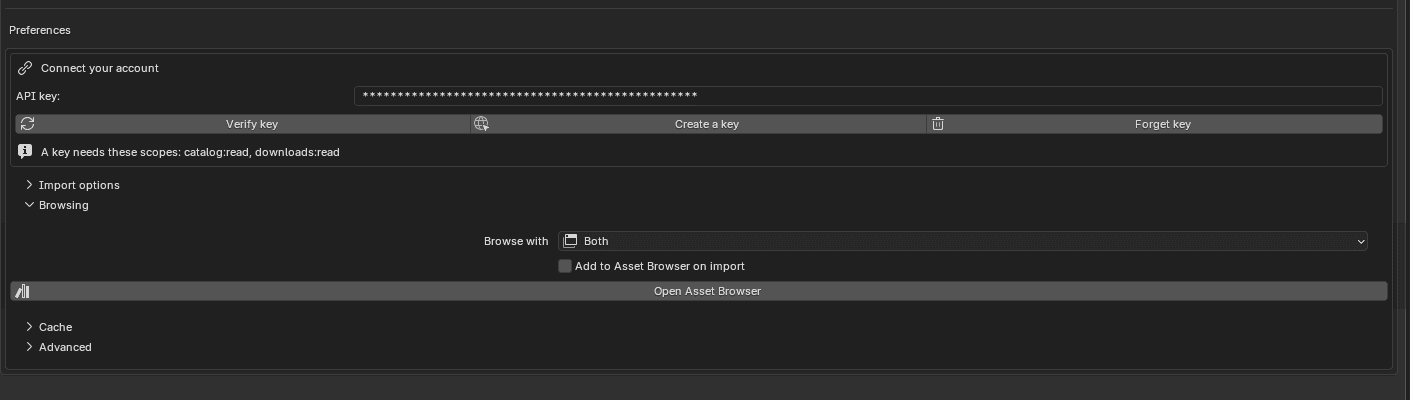
Connect once, forget about it
Paste a key from your account and you are done — no login window, no browser handoff. Revoke it from the same place whenever you want.
- Step 02
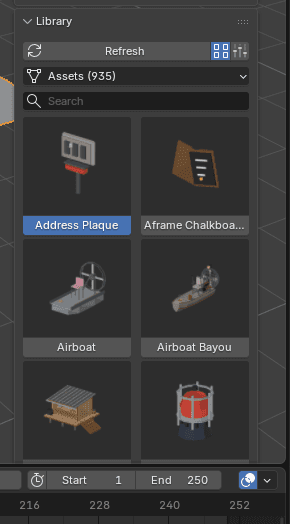
Your whole library, in the sidebar
Press N and there it is: every model and pack you own, as thumbnails you can actually recognise. Search by name, filter by kind, and keep working while it loads.
- Step 03
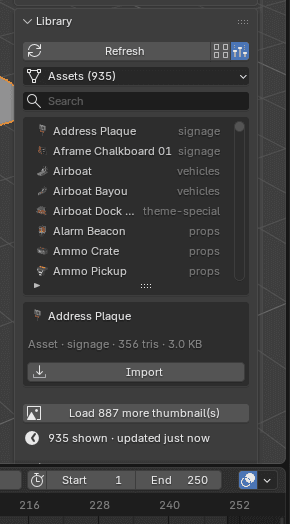
Click once. It is in your scene.
Pick a model and press Import — it downloads, unpacks and lands in its own collection, at the origin or your 3D cursor. Whole packs import the same way. Switch to list view when your library gets big.
- Step 04
Or drag them in, like any Blender asset
Turn on the Asset Browser and your models dock along the bottom of the window with previews and categories — drag them straight into the viewport, exactly like Blender's own assets.

Built to stay out of the way
The details you only notice when an add-on gets them wrong.
Updates never touch your scene
A newer version of an asset downloads alongside the old one and the panel flags it. Nothing already in your file is swapped out from under you — you re-import when you are ready.
The second import is instant
Everything is cached on disk, so reusing an asset across projects costs nothing. Clear the cache from preferences whenever you want the space back.
Free assets work too
The add-on is free and so is a threejsassets account. Start with the free models, and anything you buy later shows up in the same panel.
No store inside your 3D app
There is nothing to dismiss and nothing trying to sell you anything while you work. It shows what you own and gets out of the way.
Questions
- Is the Blender add-on free?
- Yes, and it always will be. It works with a free account and the free assets — you never need to buy anything to install or use it.
- Which Blender versions does it support?
- Blender 4.2 LTS and everything newer, on macOS, Windows and Linux. Every release is tested against 4.2, 4.5 and 5.2 LTS before it ships.
- Do I have to download and unzip anything?
- No. Pick a model and press Import — the add-on fetches it, unpacks it and puts it in your scene. Whole packs work the same way.
- Where do the files go?
- Into a cache folder inside your Blender profile, which you can move or empty from the add-on's preferences. Nothing is ever written into the add-on's own directory.
- Does it work offline?
- Anything you have already imported stays cached and imports again with no connection. Browsing new assets needs to reach the site, and the add-on honours Blender's Allow Online Access setting.
- Can I use the models commercially?
- Yes — the same licence applies as when you download from the site. Ship them in client work, games and products; just do not resell the files themselves.
- How do I update the add-on?
- Install it from the repository URL and Blender offers every future version through its own Extensions screen. Nothing auto-installs behind your back.
- Is my API key safe?
- It is stored in your Blender preferences and only ever sent to threejsassets.com, when you ask the add-on to do something. Revoke it from your account any time and it stops working immediately.